如题所述。烧录一直失败,社区和谷歌都没有答案,类似的问题只找到stm32的,也没有解决答案
报错一直是:
[apm32f0x.cpu] halted due to breakpoint, current mode: Thread
xPSR: 0xf1000000 pc: 0xfffffffe msp: 0xfffffffc
** Programming Started **
Error: Failed to read memory at 0x40015800
Error: auto_probe failed
怀疑过是外置晶振的问题,但是我把外置晶振拆了之后烧录结果还是一样
猜测焊接不良导致短路,但是拆了重焊也一样
以为是把mcu焊坏了,换一块新的pcb和mcu也一样
使用的代码是\APM32F00x_SDK_V1.4\Examples\GPIO\GPIO_Toggle 这个示例代码,没有任何改动
程序的构建使用的是cmake
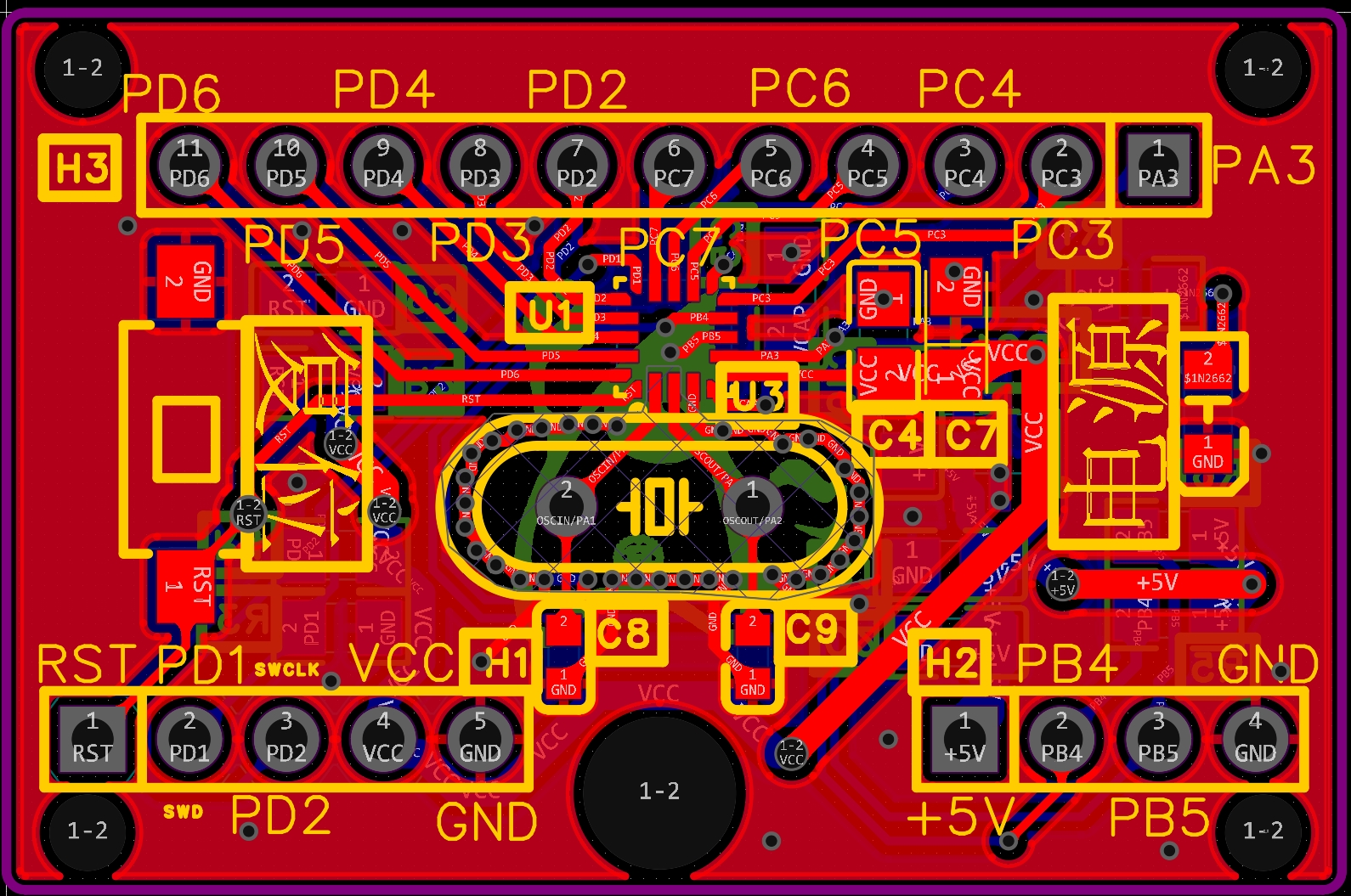
板子是我自己画的(就是照着设计指南和官网mini板子抄的)
D:\Programs\OpenOCD-20240916-0.12.0\bin\openocd.exe -s D:\Programs\OpenOCD-20240916-0.12.0\share\openocd\scripts -f E:\Stm32Doc\APM32Sdk\APM32F00x_SDK_V1.4\Examples\GPIO\GPIO_Toggle_1\apm32fF003_stlinkv2.cfg -c "tcl_port disabled" -c "gdb_port disabled" -c "tcl_port disabled" -c "program \"E:/Stm32Doc/APM32Sdk/APM32F00x_SDK_V1.4/Examples/GPIO/GPIO_Toggle_1/Project/Cmake/cmake-build-debug/firmware.elf\"" -c reset -c shutdown
[0mOpen On-Chip Debugger 0.12.0 (2024-09-16) [https://github.com/sysprogs/openocd]
Licensed under GNU GPL v2
libusb1 d52e355daa09f17ce64819122cb067b8a2ee0d4b
For bug reports, read
http://openocd.org/doc/doxygen/bugs.html
none separate
DEPRECATED! use 'tcl port' not 'tcl_port'
DEPRECATED! use '[0mgdb port', not 'gdb_port'
DEPRECATED! use 'tcl port' not 'tcl_port'
Info : STLINK V2J45S7 (API v2) VID:PID 0483:3748
Info : Target voltage: 0.014211 #<--这里电压低是因为stlinkv2的电压检测有问题,烧录stm32时也这么说,但是完全不影响,
Error: target voltage may be too low for reliable debugging
Info : clock speed 950 kHz
Error: BUG: can't assert SRST
Info : stlink_dap_op_connect(connect)
Error: BUG: can't assert SRST
Info : SWD DPIDR 0x0bc11477
Info : [apm32f0x.cpu] Cortex-M0+ r0p1 processor detected
Info : [apm32f0x.cpu] target has 4 breakpoints, 2 watchpoints
Info : [apm32f0x.cpu] Examination succeed
Info : [apm32f0x.cpu] gdb port disabled
[apm32f0x.cpu] halted due to breakpoint, current mode: Thread
xPSR: 0xf1000000 pc: 0xfffffffe msp: 0xfffffffc
** Programming Started **
Error: Failed to read memory at 0x40015800
Error: auto_probe failed
embedded:startup.tcl:1698: Error: ** Programming Failed **
in procedure 'program'
in procedure 'program_error' called at file "embedded:startup.tcl", line 1763
at file "embedded:startup.tcl", line 1698
source [find interface/stlink-dap.cfg]
transport select "dapdirect_swd"
set FLASH_SIZE 0x8000
#加载针对 Geehy APM32F0x 芯片系列的配置文件
source [find target/geehy/apm32f0x.cfg]
#设置适配器速度 (单位: kHz)
adapter speed 950
gdb port 3333
tcl port 6666
telnet_port 4444
#只使用 SRST 信号,并在连接时强制拉低。
reset_config srst_only connect_assert_srst
#使用 Cortex-M 内核的系统复位请求
#reset_config sysresetreq
#只使用 SRST 信号,不强制在连接时拉低
#reset_config srst_only
#只使用 SRST 信号,不进行时钟门控操作,也不强制在连接时拉低
#reset_config srst_nogate
原理图&pcb:


构建脚本:
# 指定构建此项目所需的 CMake 最低版本
cmake_minimum_required(VERSION 3.30)
# --- 系统及工具链设置 ---
# 目标系统为通用裸机 (Bare-metal)
set(CMAKE_SYSTEM_NAME Generic)
set(CMAKE_SYSTEM_VERSION 1)
# 交叉编译器及工具前缀 (如 arm-none-eabi-)
# 确保这些工具在系统PATH中或使用完整路径
set(TOOLCHAIN_PREFIX "arm-none-eabi-")
set(CMAKE_C_COMPILER "${TOOLCHAIN_PREFIX}gcc")
set(CMAKE_CXX_COMPILER "${TOOLCHAIN_PREFIX}g++")
set(CMAKE_ASM_COMPILER "${TOOLCHAIN_PREFIX}gcc")
set(CMAKE_AR "${TOOLCHAIN_PREFIX}ar")
set(CMAKE_OBJCOPY "${TOOLCHAIN_PREFIX}objcopy")
set(CMAKE_OBJDUMP "${TOOLCHAIN_PREFIX}objdump")
set(SIZE "${TOOLCHAIN_PREFIX}size")
# 裸机编译尝试目标类型
set(CMAKE_TRY_COMPILE_TARGET_TYPE STATIC_LIBRARY)
# 项目名称和语言
project(GPIO_Toggle C CXX ASM)
# 清空标准库变量 (防止链接主系统库)
set(CMAKE_C_STANDARD_LIBRARIES "")
set(CMAKE_CXX_STANDARD_LIBRARIES "")
# --- 设备及板级设置 ---
if (NOT DEFINED ENV{APM32SDKS} OR "$ENV{APM32SDKS}" STREQUAL "")
message(FATAL_ERROR "Environment variable APM32SDKS is not set or is empty. Please set it to the root directory of your APM32 SDK.")
endif ()
set(APM32SDKS $ENV{APM32SDKS})
# Optional: Check if the path exists and is a directory
if (NOT EXISTS "${APM32SDKS}" OR NOT IS_DIRECTORY "${APM32SDKS}")
message(FATAL_ERROR "APM32SDKS path does not exist or is not a directory: ${APM32SDKS}")
endif ()
set(DEVICE_ID "APM32F00x") # 设备ID
set(SDK_VERSION "V1.4") # sdk 版本
set(BSP_DEFINE "APM32F003_MINI") # 板级定义宏
set(BSP_DIR_NAME "Board_APM32F003_MINI") # 板级目录名
#对应 Flash 大小(以 KB 为单位),遵循的命名规则:
#x4: 16KB Flash
#x6: 32KB Flash
#x8: 64KB Flash
#xB: 128KB Flash
#xC: 256KB Flash
#xD: 384KB Flash
#xE: 512KB Flash
set(FLASH_SIZE "x6")
# APM32F10X_LD: APM32 Low density devices, the Flash memory density ranges between 16 and 32 Kbytes.
# APM32F10X_MD: APM32 Medium density devices, the Flash memory density ranges between 64 and 128 Kbytes.
# APM32F10X_HD: APM32 High density devices, the Flash memory density ranges between 256 and 512 Kbytes.
# APM32F10X_CL: APM32 Connectivity line devices, such as APM32F105xx and APM32F107xx serial devices.
set(DEVICE_SIZE "LD") #设备容量类型 <--(F003系列不需要这个参数)
#APM32E0 / F0:Cortex-M0 / M0+ ; m0+ : m0plus
#APM32E1 / F1:Cortex-M3
#APM32F4:Cortex-M4F
#APM32H7:Cortex-M7
set(CORE_TYPE "cortex-m0plus") #内核类型
# 根据 DEVICE_ID 选择启动文件和链接脚本
if ("${DEVICE_ID}" STREQUAL "APM32F405xx")
message(FATAL_ERROR "${DEVICE_ID} support not fully configured")
elseif ("${DEVICE_ID}" STREQUAL "APM32F10x")
if (${DEVICE_SIZE} STREQUAL "LD" OR ${DEVICE_SIZE} STREQUAL "MD")
set(STARTUP_FILE startup_${DEVICE_ID}_md.S) # 启动文件
elseif (${DEVICE_SIZE} STREQUAL "HD")
set(STARTUP_FILE startup_${DEVICE_ID}_hd.S) # 启动文件
elseif (${DEVICE_SIZE} STREQUAL "CL")
set(STARTUP_FILE startup_${DEVICE_ID}_cl.S) # 启动文件
else ()
message(FATAL_ERROR "Please set device size")
endif ()
elseif ("${DEVICE_ID}" STREQUAL "APM32F00x")
# 由于APM32F00x 的 boards 下的 boards.h 的宏定义使用下面的样子检查需要包含哪个头
##ifdef BOARD_APM32F003_MINI
##include "Board_APM32F003_MINI/inc/Board_APM32F003_MINI.h"
##include "Board_APM32F003_MINI/inc/bsp_delay.h"
##endif
#而APM32F10x 的boards 下的 board.h 的宏定义使用:
# #if defined (APM32F103_MINI)
# #include "Board_APM32F103_MINI/inc/Board_APM32F103_MINI.h"
# #elif defined (APM32F103VCS_MINI)
# #include "Board_APM32F103VCS_MINI/inc/Board_APM32F103VCS_MINI.h"
# #elif defined (APM32F107_MINI)
# #include "Board_APM32F107_MINI/inc/Board_APM32F107_MINI.h"
# #else
# #error "Please select first the APM32 board to be used (in board.h)"
# #endif
#
#因为如上原因此处需要如下处理,讲实话这太令人难受了,居然这样,
#
string(TOUPPER ${BSP_DIR_NAME} BSP_DEFINE)
set(STARTUP_FILE startup_${DEVICE_ID}.S) # 启动文件
else ()
message(FATAL_ERROR "Please select target device")
endif ()
set(LINKER_FILE gcc_${DEVICE_ID}${FLASH_SIZE}.ld) # 链接脚本文件
# 链接脚本完整路径
set(LINKER_SCRIPT ${APM32SDKS}/${DEVICE_ID}_SDK_${SDK_VERSION}/Libraries/Device/Geehy/${DEVICE_ID}/Source/gcc/${LINKER_FILE})
# --- 构建配置 (全局) ---
# 添加预处理定义宏
#转换处理设备ID成大写以符合sdk中的要求
#if !defined (APM32F10X_LD) && !defined (APM32F10X_MD) && !defined (APM32F10X_HD) && !defined (APM32F10X_CL)
##error "Please select a the target APM32F10x device used in your application (in apm32f10x.h file)"
##endif
string(TOUPPER ${DEVICE_ID} UPPER_DEVICE_ID)
add_definitions(
-D${CMAKE_BUILD_TYPE}
-D${DEVICE_ID}
-D${BSP_DEFINE}
-D${UPPER_DEVICE_ID}_${DEVICE_SIZE}
)
# 添加编译选项 (C/CXX)
# 检查 -mcpu 与芯片内核一致性 (Cortex-M3)
add_compile_options(
-mcpu=${CORE_TYPE} -mthumb -mthumb-interwork
-ffunction-sections -fdata-sections -fno-common -fmessage-length=0
)
# 为汇编文件启用预处理
add_compile_options(
$<$<COMPILE_LANGUAGE:ASM>:-x$<SEMICOLON>assembler-with-cpp>
)
# 根据构建类型设置优化级别
if ("${CMAKE_BUILD_TYPE}" STREQUAL "Release")
message(STATUS "Building Release (speed)")
add_compile_options(-Ofast)
elseif ("${CMAKE_BUILD_TYPE}" STREQUAL "RelWithDebInfo")
message(STATUS "Building RelWithDebInfo (speed + debug)")
add_compile_options(-Ofast -g)
elseif ("${CMAKE_BUILD_TYPE}" STREQUAL "MinSizeRel")
message(STATUS "Building MinSizeRel (size)")
add_compile_options(-Os)
else () # 默认为 Debug
message(STATUS "Building Debug (debug)")
add_compile_options(-Og -g)
endif ()
# 添加头文件搜索路径
include_directories(
../../Include
../../Config/Include
${APM32SDKS}/${DEVICE_ID}_SDK_${SDK_VERSION}/Boards/
${APM32SDKS}/${DEVICE_ID}_SDK_${SDK_VERSION}/Libraries/${DEVICE_ID}_StdPeriphDriver/inc
${APM32SDKS}/${DEVICE_ID}_SDK_${SDK_VERSION}/Boards/${BSP_DIR_NAME}/inc
${APM32SDKS}/${DEVICE_ID}_SDK_${SDK_VERSION}/Libraries/Device/Geehy/${DEVICE_ID}/Include
${APM32SDKS}/${DEVICE_ID}_SDK_${SDK_VERSION}/Libraries/CMSIS/Include
)
# --- 源文件收集 ---
# 注意: file(GLOB_RECURSE) 不推荐,新文件需重跑CMake
file(GLOB_RECURSE SOURCES
# 启动文件
${APM32SDKS}/${DEVICE_ID}_SDK_${SDK_VERSION}/Libraries/Device/Geehy/${DEVICE_ID}/Source/gcc/${STARTUP_FILE}
../../Source/*.c
# Glob 您使用的板级支持目录下的源文件
${APM32SDKS}/${DEVICE_ID}_SDK_${SDK_VERSION}/Boards/${BSP_DIR_NAME}/src/*.c
# 将这里的 Source 改为 src,Glob 标准外设库 (StdPeriph Driver) 的源文件
${APM32SDKS}/${DEVICE_ID}_SDK_${SDK_VERSION}/Libraries/${DEVICE_ID}_StdPeriphDriver/src/*.c
)
# 添加链接选项 (全局)
# 检查 -mcpu 与编译选项一致
add_link_options(
-T ${LINKER_SCRIPT} # 链接脚本
-Wl,-gc-sections # 垃圾回收
-Wl,--print-memory-usage # 打印内存使用
-Wl,-Map=${PROJECT_BINARY_DIR}/firmware.map # 生成map文件
-mcpu=${CORE_TYPE}
-mthumb
-mthumb-interwork
)
# --- 目标定义 ---
# 添加可执行目标 (固件)
add_executable(firmware.elf ${SOURCES})
# --- 后处理步骤 ---
# 定义生成文件名称
set(HEX_FILE ${PROJECT_BINARY_DIR}/firmware.hex)
set(BIN_FILE ${PROJECT_BINARY_DIR}/firmware.bin)
# 添加后处理命令: 生成 Intel Hex 格式文件
# 每个后处理步骤使用一个独立的 add_custom_command 调用
add_custom_command(TARGET firmware.elf POST_BUILD
COMMAND ${CMAKE_OBJCOPY} -Oihex $<TARGET_FILE:firmware.elf> ${HEX_FILE}
COMMENT "Building ${HEX_FILE}" # COMMENT 放在 COMMAND 后面
)
# 添加后处理命令: 生成 Binary 格式文件
add_custom_command(TARGET firmware.elf POST_BUILD
COMMAND ${CMAKE_OBJCOPY} -Obinary $<TARGET_FILE:firmware.elf> ${BIN_FILE}
COMMENT "Building ${BIN_FILE}" # COMMENT 放在 COMMAND 后面
)